Showing posts with label drive. Show all posts

Saturday, January 24, 2015

Google Apps as LMS and PLE

Original

In the digital era of Education, Learning Management Systems are delineating themselves as good allies for the teaching practice, providing a canvas to place contents, PLE curating tools, a secure environment to work in, different collaboration modes, activity control systems and several ways of assessment.


But, what LMS would suit you best? That depends on your needs, your audience, your digital abilities, the LMS’s complexity and your budget. There are multiple options, as Moodle, Edmodo or Google Classroom, among many others.

This article is going to focus on the free edition of Google Apps. During the last years they have been put to an enhancement process, and, nowadays, they can be effectively used for educational purposes. To do so, they have to be synergistically constellated to create a consistent and coherent system. If you aren’t familiar with them (or don’t know how to use them), have a look at Google’s documentation: http://learn.googleapps.com/home

Go on reading the full article in EDTECHREVIEW.IN

Saturday, September 13, 2014

Google Apps

Google Apps has finally made the difference. And with its offline applications your productivity will boost incredibly. Go on reading…


рівняннями, малюнками,Google Apps is a bunch of office-like applications, as docs, slides or sheets. If you have a Google account then you can go directly to drive.google.com and sign in. It's free!


Even though its functionality can look scarce in comparison with other applications, as OpenOffice, there are plenty of advantages to make the shift:


  1. Integrated tools: research, dictionary...
  2. Easy way to embed links, images, citations, graphs...
  3. Compatibility across Google apps.
  4. Compatibility across multiple devices (I'm writing this article using my mobile device while I'm lying on my towel tanning under the sun).
  5. Offline working mode.

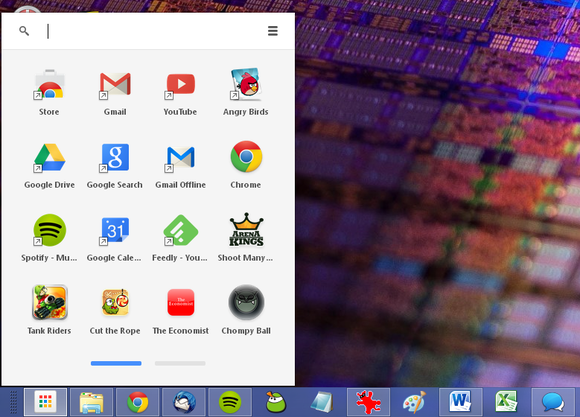
The offline functionality option has been, in my opinion, the key to beat Google’s competence. To enable it go to Chrome Web Store and look for offline apps. Install docs, sheets and slides (you could also install Gmail, Drive, Calendar, Drawings…).


chrome-launcher-in-use-100046778-large.png


From this moment on you can create,view and edit documents/slides/... using your Chrome browser. Offline applications are gathered inside a new icon on the bottom bar. Next time you go online Chrome will synchronise everything automatically. In the meanwhile your data will be saved to your computer.


As you can see it's a great way to work while going to the school by train, when at the beach... You don't have to worry any more about saving your work, taking your memory sticks with you, or even fear of losing your data.